Servycore can send real-time notifications to your Discord server via webhooks. Get instant alerts when players link accounts or support tickets are created, and, with the Control Center, alerts and announcements for your Rust servers.
Notification Types
| Type | Trigger Events |
|---|---|
| Link | Player account linking and unlinking events |
| Support | Support ticket creation and updates |
With the Control Center, the Rust cards are added: Server Alerts, Moderation Alerts, Wipe Announcements (wipe messages for your players, written on each server's Wipes page), Live Server Status and Kill Feed.
Each type uses its own webhook URL, so you can send different notifications to different Discord channels.
Public or staff only
Each card on the Notifications page shows who it is for:
| Card | For | Why |
|---|---|---|
| Link | Staff only | Each message shows a player's Steam ID next to their Discord or Twitch account: anyone who reads it can tie these accounts together |
| Support | Staff only | Ticket titles written by players, their name and Steam ID |
| Server Alerts, Moderation Alerts (Control Center) | Staff only | Internal details of your servers, reporters' names, ban and failure reasons |
| Wipe Announcements, Live Server Status, Kill Feed (Control Center) | Public | Made for your players |
Send the Staff only cards to a channel only your staff can read: in a public channel, every member would see confidential information. The page warns you when a staff card and a public card use the same channel.
Setting Up Webhooks
Step 1: Create a Discord Webhook
- Open your Discord server
- Go to Server Settings > Integrations > Webhooks
- Click New Webhook
- Choose the channel where you want notifications
- Copy the webhook URL
Step 2: Configure in Servycore
Navigate to Panel > Your Project > Notifications and select the notification type you want to configure.
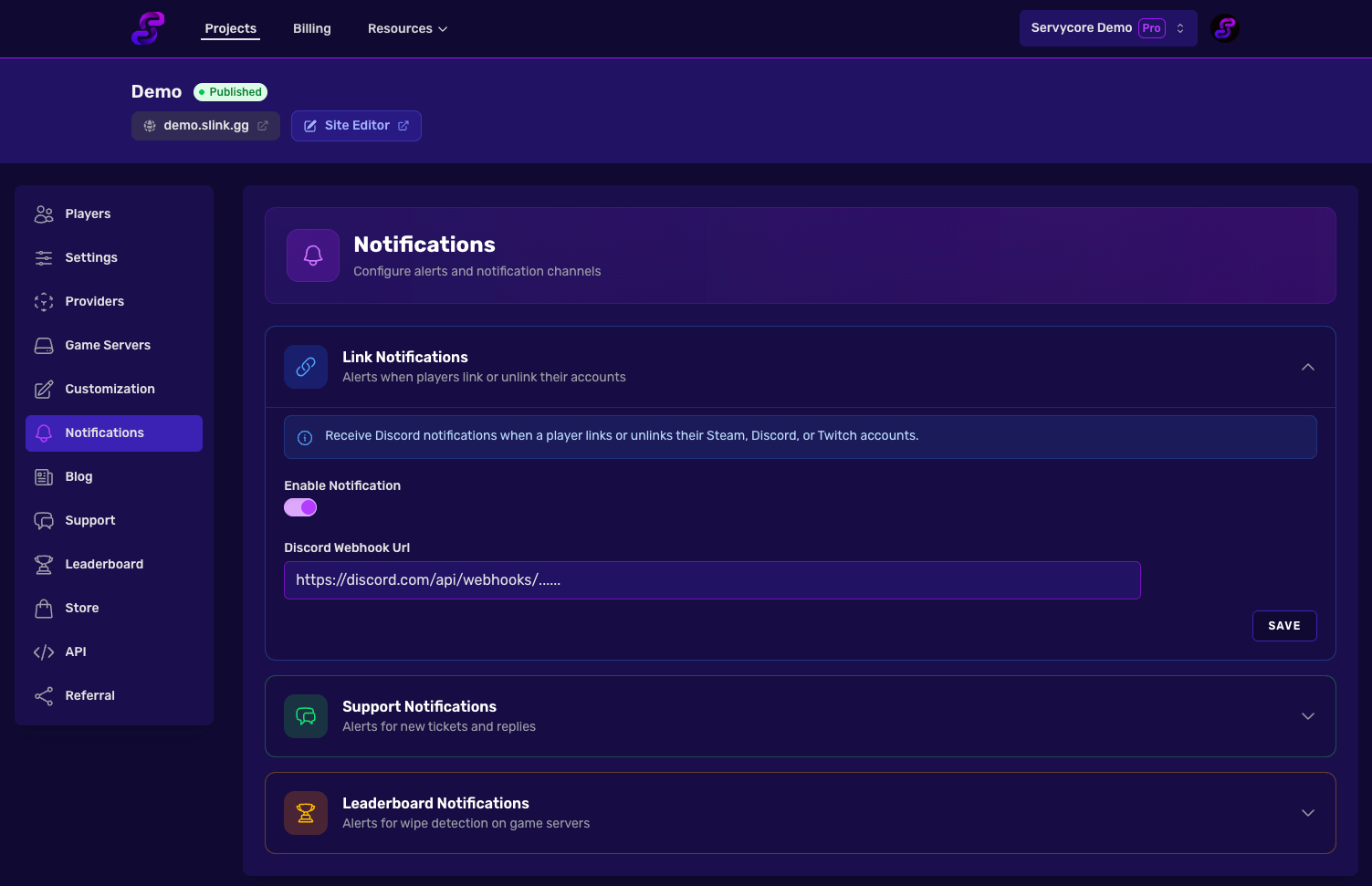
For each notification type, the configuration is the same:
| Setting | Description |
|---|---|
| Enable Discord Notification | Toggle to enable/disable notifications |
| Discord Webhook URL | The webhook URL from your Discord server |
Notes
- Webhook URLs are validated to ensure they are valid Discord webhook URLs
- Each notification type is independent — you can enable one without the others
- You can use different channels for each notification type by using different webhook URLs
- Notifications are sent in real-time as events occur