Rust Wipe Planner
See when the next force wipe lands, plan your own wipe days around it, and put them all in your calendar.
Next force wipe in
25days 22h 53m
Thursday, November 5, around 19:00 UK time
Your time: Thursday, November 5, 19:00 UTC
Servers wipe once Facepunch releases the update.
Coming force wipes
- 19:00 GMT
- 19:00 GMT
- 19:00 GMT
- 19:00 GMT
- 19:00 GMT
- 19:00 BST
- 19:00 BST
- 19:00 BST
- 19:00 BST
- 19:00 BST
- 19:00 BST
- 19:00 BST
servycore.io/tools · Rust · rev. Oct 2026
The one wipe every server shares
Once a month Facepunch ships the Rust update, on the first Thursday of the month, in the evening UK time. The new version cannot load the old world, so every Rust server, official or community, wipes its map that day. It is the busiest evening of the month: players look for a fresh start, and every server is fresh at the same time.
The update usually lands around 19:00 UK time (19:00 GMT in winter, 18:00 UTC during British Summer Time). The exact minute moves from month to month, because servers wipe when Facepunch publishes the new server build, not at a fixed time. A server that wipes at 19:00 sharp while the update comes out at 19:20 opens on a version the new client cannot join.
Planning your own wipes around it
Most community servers wipe more often than once a month: every week, or every two weeks. A few rules keep the calendar sane:
- Pick one weekday and stick to it. Players remember "Thursday wipe" better than any date. Thursday is popular because it lines up with the force wipe.
- Skip the wipe that falls just before a force wipe. A fresh map that dies two days later frustrates everyone. The planner above crosses those out for you: set how many days before a force wipe a regular wipe is dropped.
- Never wipe the day after a force wipe. The force wipe already gave everyone a new map; the planner treats a wipe within a day of it as replaced.
- Say it in the server name and description, and with the
weekly,biweeklyormonthlybrowser tag, so players can filter for your rhythm.
Pick your cycle in the planner, check the timeline, and download your wipe days: the file holds your regular wipes and every force wipe, skipped dates left out.
What a wipe deletes
| Map wipe | Map + blueprints | Full wipe | |
|---|---|---|---|
| Buildings, loot, deployables | Deleted | Deleted | Deleted |
| Player inventories and positions | Deleted | Deleted | Deleted |
| Learned blueprints | Kept | Deleted | Deleted |
| Player stats, identities, clans | Kept | Kept | Deleted |
| Server config, bans, admins | Kept | Kept | Kept |
| Steam skins and items | Never touched | Never touched | Never touched |
Only the map has to go on force wipe day; blueprints are the owner's call. Many servers wipe blueprints once a month, on the force wipe, and only the map in between. The wipe guide lists the exact files behind each column, and the one file you must never delete.
Keeping the dates in your calendar
- Subscribe to force wipes: your calendar app follows the next twelve and refreshes the list every day.
- Download my wipe days: a one-off file with your own cycle and the force wipes, to import or to share with your staff.
- Google Calendar: adds the next force wipe in one click.
Making wipe day automatic
With Servycore, wipe day runs on its own. The Auto-wipe system follows the same rules as this planner (your cycle, force wipes, the skip window), and on the day it waits for the new Rust build on Steam and for Oxide or Carbon to follow, stops the server, backs it up, deletes the right files, picks the next map, starts it again and checks that the world really changed. Players see a countdown in the chat and in Rust's own wipe timer, and your Discord gets the announcements before and after.
Questions people ask
What time does the Rust force wipe happen?
On the first Thursday of the month, usually around 19:00 UK time (18:00 UTC in summer). Servers wipe once Facepunch publishes the new server build, so the exact minute changes every month.
Are blueprints wiped on force wipe day?
Only if the server owner deletes the blueprint files. Every server must wipe its map that day; blueprints are a choice, often made once a month.
Should I wipe the week before a force wipe?
Usually not. A map that only lives a day or two before the force wipe replaces it is rarely worth it. Skip it and let the force wipe be your next wipe; the planner does this for you.
Can my players follow my wipe days in their calendar?
Yes. Plan your cycle above and download your wipe days: the file works in Google Calendar, Apple Calendar and Outlook. Share it with your community, or post it on your server's website.
How do I automate the force wipe?
Servycore connects to your server with RCON and to your Pterodactyl, Pelican or WISP panel, then waits for the update, wipes, changes the map, restarts and announces it in game and on Discord.
With Servycore
Let wipe day run itself
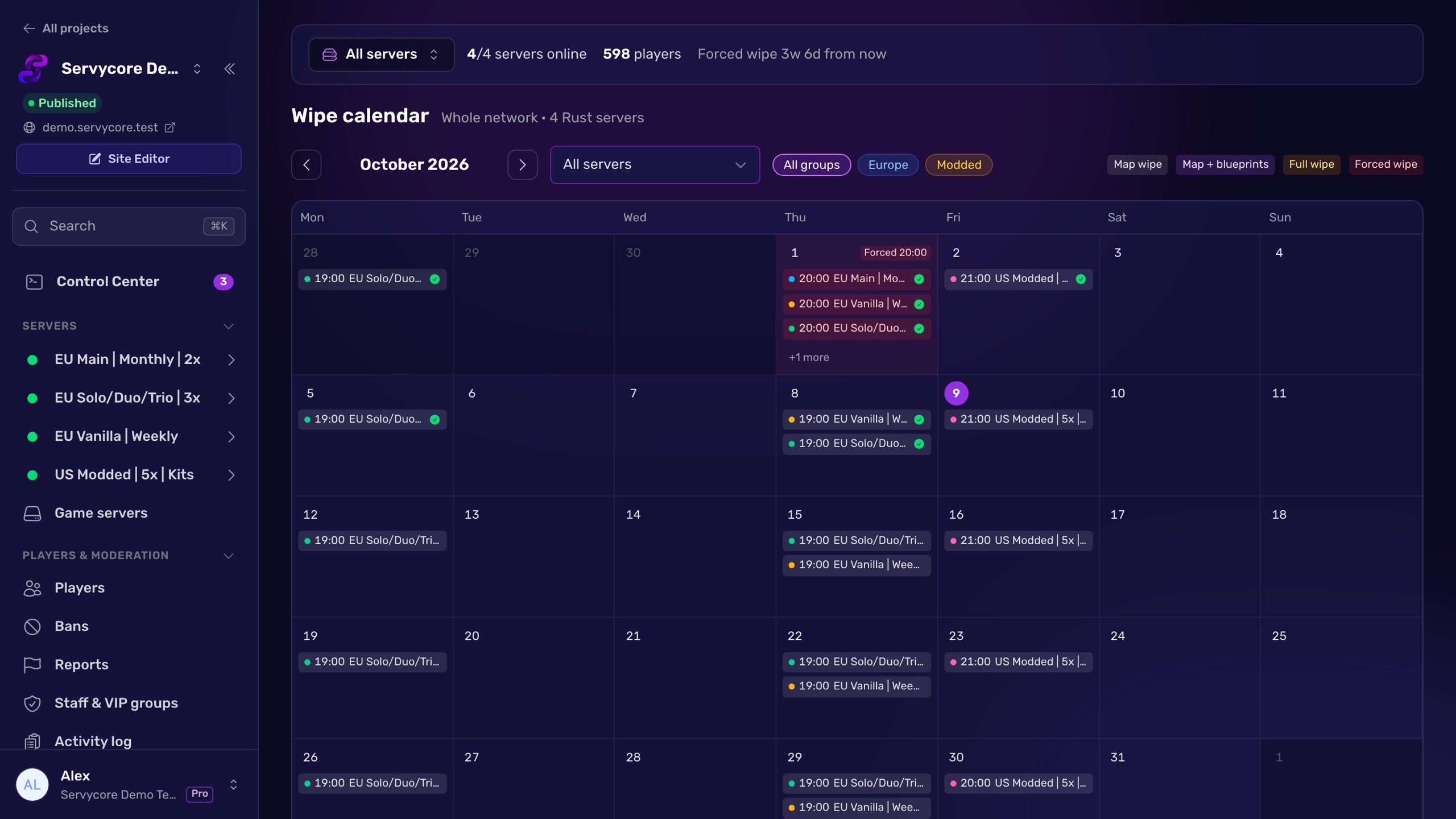
Servycore waits for the update, stops your server, backs it up, deletes the wipe files, changes the map, starts it again and announces it in game and on Discord. The whole network on one calendar.
- How the Auto-wipe system works in the knowledge base
- Wipe announcements on Discord in the knowledge base
Read next
- How to wipe a Rust server Map, blueprint or full wipe: the exact files to delete in server/<identity>/, the ones to keep, and how to handle force wipe day step by step.
- How to change the map on a Rust server Set a new seed and size or a custom map URL where Rust actually reads them, avoid loading an old save, and check the new map is live.
- Rust Admin Commands Rust admin and RCON commands with syntax, examples and which ones work over RCON, checked against Rust's own code. Players, bans, staff, server, Oxide and Carbon.