How to use RCON on a Rust server
Turn on Rust WebRCON, connect, and learn which admin commands work over RCON, plus the password and IP-ban rules that lock people out.
7 minute read, checked against Rust's own code. Updated .
RCON is the remote console of your Rust server: it lets you run the same commands as the server console from anywhere, without being in game. To use it, start the server with an RCON port and a strong password on its launch line, open that TCP port, then connect with a WebRCON client. Everything else, from bans to restarts, is a console command sent over that connection.
How Rust RCON works
Rust speaks WebRCON: a WebSocket connection to the RCON port of your server. It is on by default (rcon.web is true); the old Source-engine RCON still exists behind rcon.web 0, but Rust marks it as deprecated.
A WebRCON client connects to an address of the form ws://<server-ip>:<rcon-port>/<password>. The password is part of the address itself, which has two consequences:
- keep it to letters, digits,
-and_: other characters have to be encoded in a URL and are an easy way to lock yourself out; - treat any saved RCON address like the password it contains.
Once connected, three things travel on the connection:
- replies: the answer to a command goes only to the client that sent it;
- log lines: everything the server writes to its console is pushed to every connected client;
- chat: what players type is pushed to every client too.
Several clients can be connected at the same time. Your host's web console usually keeps one connection open all the time, and the current build allows up to rcon.maxconnections 500 connections in total and rcon.maxconnectionsperip 5 from one address.
Turn RCON on
RCON starts only if the server is launched with a password on its command line. Rust reads rcon.password from the launch options, not from server.cfg:
+rcon.port 28016 +rcon.password "YourLongRandomPassword" +rcon.web 1
A few rules decide whether it actually starts:
- An empty password, or
password, leaves RCON off. Recent builds also refuse other common weak passwords. Use a long random string. rcon.portdefaults to the game port (server.port, 28015). Most servers set it to 28016; the game's query port then sits right after, on 28017.rcon.ipchooses the address RCON listens on. The default,0.0.0.0, listens everywhere.- Open the RCON port in your firewall (TCP). The game port is UDP: opening one does not open the other.
On a game panel, the RCON password and port are usually fields of the server's startup settings rather than a line you type. If a plugin framework runs its own RCON (Oxide has an RCON option in oxide.config.json), Rust's own WebRCON can stay off: leave the framework's option disabled and use Rust's.
Connect and check
Connect with any WebRCON client and send serverinfo. The server answers with a JSON summary: hostname, players, queue, FPS, entity count, uptime, map and version. If you get that answer, RCON works.
Useful read-only commands to start with:
statusorplayers: who is online, with their SteamIDs;playerlist: the same list as JSON, with ping and connection time;console.tail 50andchat.tail 50: the last console lines and chat messages, handy right after you connect;bans: the server's ban list as JSON.
The F1 console in game is not RCON: commands typed there run as your player, with your admin rights. Over RCON there is no player at all, which matters for the next section.
Commands that work over RCON, and those that don't
RCON runs a command as the server itself. A command that acts on the person who types it has nobody to act on, so it does nothing. Commands that take their target as an argument work fine:
| Works over RCON | What it does |
|---|---|
kick <player> "<reason>" |
Kicks an online player |
ban <player> "<reason>" / banid <steamid> "<name>" "<reason>" |
Bans an online player / any SteamID |
ownerid <steamid> "<name>" "<reason>", moderatorid … |
Gives an in-game role |
say "<message>" |
Sends a message to every player |
restart <seconds> "<message>" |
Counts down in game, saves and quits |
server.save, server.writecfg |
Saves the world / writes the config files |
killplayer <player>, injureplayer <player>, recoverplayer <player> |
Kills, downs or stands up a player |
teleport <player> <player> |
Moves the first player to the second |
Commands such as teleport2me or teleportany move the caller: over RCON they have no effect. The Rust admin commands reference marks every command as working over RCON or in game only.
Three behaviours catch people out:
- A typo gets no answer at all. Rust stays silent on an unknown command, so a client that waits for a reply just times out.
- Role and ban changes are not saved until
server.writecfg.banid,owneridandmoderatoridtake effect at once, but a restart forgets them unless you write the config files. restartonly quits. It saves and stops the process; your host (or its watchdog) is what starts the server again.
Keep RCON safe
Anyone who has the RCON password can run every console command: ban anyone, give themselves items, shut the server down. A few habits keep it under control:
- Rust bans an IP after 5 wrong passwords, for 300 seconds by default (
rcon.maxpasswordfailuresandrcon.banduration).rcon.print_rcon_failed_loginslists the attempts, andrcon.clear_rcon_failed_loginsclears them after a mistake. - Rust logs every RCON command with the client's address and name in the
command_historyfolder of your server identity. Check it when something happened that nobody admits to. - Do not share the password with your moderators. Give them in-game roles or a tool that acts for them instead: a password, once shared, ends up everywhere.
- Change it when a staff member leaves, then update every tool that uses it.
When the connection fails
- The connection opens, then closes straight away without a message: the password is wrong, or your IP is banned after too many failures. Wait for the ban to end, then try again with the right password.
- It connects but nothing ever answers: the server is still starting (it accepts connections before it is ready), or the command does not exist.
- It never connects: wrong port (many hosts assign their own ports), firewall, or RCON is off because the password is empty or too weak.
With Servycore
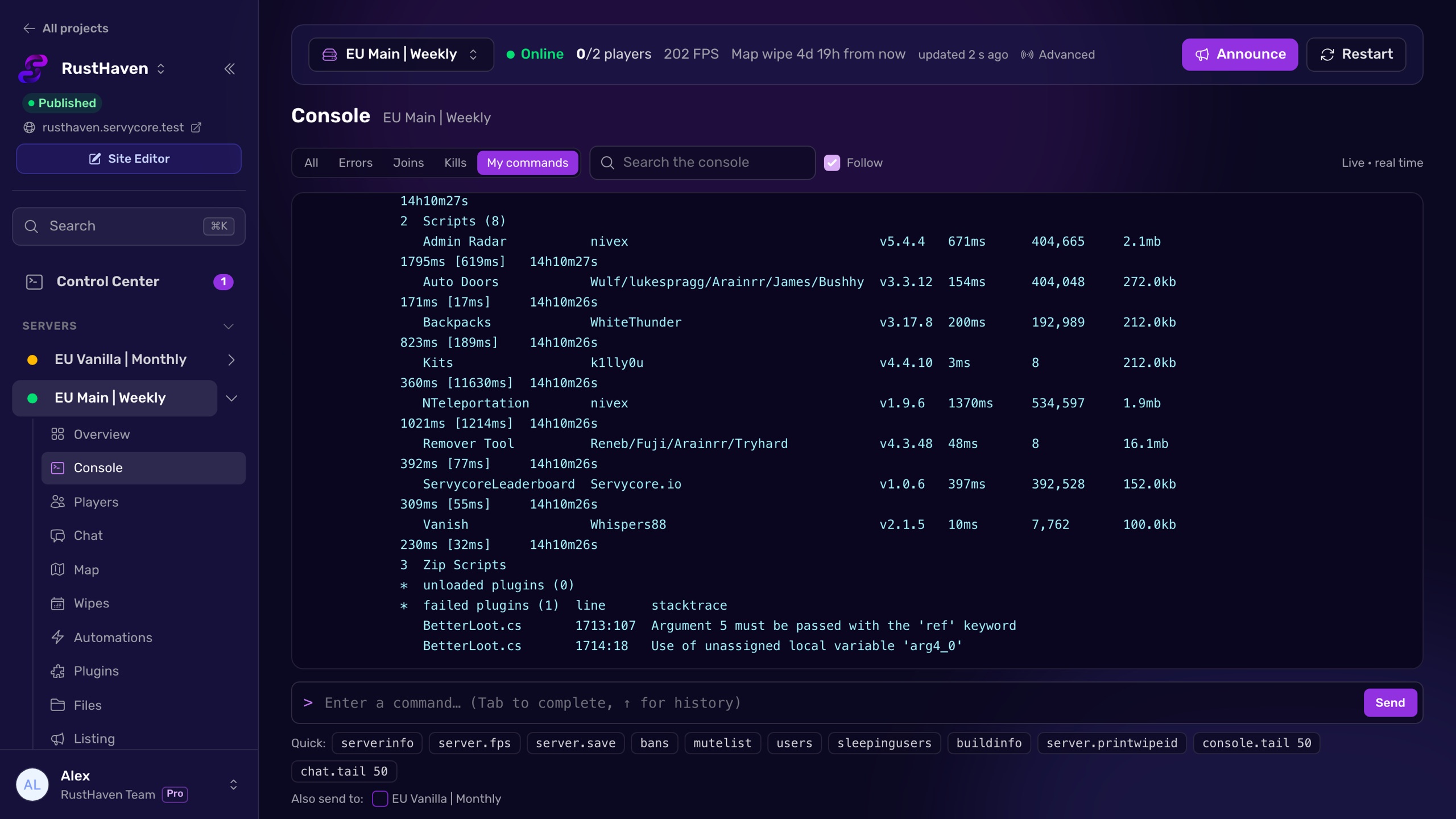
Servycore connects to your server with the RCON password once, then gives your team a web console with the live console and chat, player lists, bans, restarts and announcements. The password stays with Servycore: your moderators get the tools their role allows and never see it, and every action is written to the activity log with the name of the person who did it, which also appears in Rust's own command history.
Questions people ask
What port does Rust RCON use?
The one you set with rcon.port. Without it, RCON uses the game port (server.port, 28015 by default); most servers set it to 28016. Many hosts assign their own ports, so check your panel.
Can I put the RCON password in server.cfg?
No. Rust reads rcon.password from the launch options only. Add +rcon.password "…" to the command line, or fill the RCON password field of your game panel.
Why does my RCON client disconnect right after connecting?
That is how Rust refuses a wrong password: the connection opens, then closes without any message. The same happens when your IP is banned after 5 failed attempts. Check the password and wait for the ban (300 seconds by default) to end.
Why does a command get no answer over RCON?
Either the command does not exist (Rust stays silent on unknown commands, so check the spelling), or the server is still loading and not answering yet.
Is it safe to give my moderators the RCON password?
It gives them every console command, including shutting the server down. Prefer in-game roles, or a panel that runs the commands for them and keeps the password to itself.
With Servycore
A web console for your whole team
Servycore connects with your RCON password once and gives your staff a live console, chat, players and bans in the browser. The password never leaves Servycore and every action is logged with a name.
- Connect your server with RCON in the knowledge base
- What the Control Center does in the knowledge base
Read next
- Rust Admin Commands Rust admin and RCON commands with syntax, examples and which ones work over RCON, checked against Rust's own code. Players, bans, staff, server, Oxide and Carbon.
- Rust Server Convars Rust server convars with defaults from the game's code: listing, map, gameplay, chat, RCON, saves and decay, and where each one belongs.
- How to add an admin on a Rust server Make a player owner or moderator on your Rust server with ownerid and moderatorid, save it with server.writecfg, and avoid the traps.
- How to ban a player on a Rust server Ban, temp-ban and unban players on Rust with ban, banid and server.writecfg, and block banned players on every server with a central ban list.