Oxide vs Carbon: which Rust modding framework?
Oxide (uMod) and Carbon compared for Rust server owners: commands, folders, admin groups, plugin compatibility and how to switch between them.
6 minute read, checked against Rust's own code. Updated .
Oxide (uMod) and Carbon are the two modding frameworks of Rust: both load C# plugins on your server, both have groups and permissions, and Carbon also runs plugins written for Oxide. The differences that matter day to day are the commands (oxide. versus c.), the folder names, and a few behaviours around groups and admins. Pick the one your host supports and your plugins are tested on, then learn its commands.
What they have in common
Whichever you run, the basics are the same:
- Plugins are
.csfiles dropped in apluginsfolder at the root of the server. The framework compiles and loads a new or changed file by itself, without a restart. - Each plugin has a config, data and language files in their own folders, so you can update the plugin without losing its settings.
- Permissions work with groups: you grant a plugin permission to a group, then add players to the group.
- Both follow Rust's monthly update: each publishes a new release for the new Rust version, and the server should get it before plugins are expected to work again.
That is why the same plugin page on uMod or Codefling can serve both: a plugin written for Oxide loads on Carbon too.
The differences, side by side
| Oxide (uMod) | Carbon | |
|---|---|---|
| Command prefix | oxide. |
c. |
| Check the version | oxide.version |
c.version |
| List the plugins | oxide.plugins (text: version, author, time and memory per plugin) |
c.plugins (loaded, unloaded and failed plugins; --json for a machine-readable list) |
| Plugins folder | oxide/plugins |
carbon/plugins |
| Configs folder | oxide/config |
carbon/configs |
| Data, language, logs | oxide/data, oxide/lang, oxide/logs |
carbon/data, carbon/lang, carbon/logs |
Old oxide. commands |
— | Refused by default; aliases can be enabled in carbon/config.json |
Owners in the admin group |
Added at each connection, never removed | Added or removed to follow the player's role |
Commands: same words, different prefix
The permission commands read the same once you swap the prefix:
oxide.grant group vip kits.vip          c.grant group vip kits.vip
oxide.revoke group vip kits.vip         c.revoke group vip kits.vip
oxide.usergroup add <steamid> vip       c.usergroup add <steamid> vip
oxide.group add vip                     c.group add vip
oxide.show group vip                    c.show group vip
oxide.show perms                        c.show perms
The trap is the other way round: Carbon does not run oxide. commands out of the box. Only a handful of aliases are on by default; oxide.usergroup and friends get no answer at all, as if they did not exist. If a plugin, a script or a tool sends oxide. commands to a Carbon server, either rewrite them with c. or enable the aliases in Carbon's config.
Admins and the admin group
Rust's own roles (ownerid, moderatorid) and the framework's admin group are two different things:
- Oxide puts owners in its
admingroup when they connect, and never takes them out. Removing someone's owner role does not remove theiradmingroup: do it by hand withoxide.usergroup remove <steamid> admin. - Carbon follows the role: it adds owners to
adminand removes the group when the role goes.
If you have ever wondered why a former admin still had admin-only plugin features on an Oxide server, this is usually why.
Players who never joined
Both frameworks refuse to put a SteamID in a group if that player never connected to the server: Carbon answers "Couldn't find that player.", Oxide a "player not found" message. Give the group after the player's first connection, or use a tool that waits for it.
How to tell which one your server runs
Send these from the server console or RCON:
c.versionanswers on Carbon;oxide.versionanswers on Oxide;- neither answers on a vanilla server.
Rust stays silent on a command it does not know, so "no answer" is the answer here. The folders tell you too: an oxide folder or a carbon folder at the root of the server. Watch out for leftovers: a server that switched frameworks can keep the old folder.
Switching from Oxide to Carbon (or back)
- Plugins: the same
.csfiles work; move them fromoxide/pluginstocarbon/pluginsand check each one loads. - Configs and data: they live in each framework's own folders (
oxide/config→carbon/configs,oxide/data→carbon/data). Move what you need and keep a backup of the old folders. - Commands everywhere else: anything that sends
oxide.commands (linking rewards, scheduled tasks, shop deliveries) has to switch toc.on Carbon, unless you enable the aliases. - Groups and permissions: check them after the switch with
c.show groupsandc.show group <name>, and give back what is missing.
Make the switch on a wipe day: the server restarts anyway and players expect changes.
Which one should you choose?
There is no wrong answer, but a few questions decide it for you:
- What does your host offer? Most panels have a framework option; use the one it installs and keeps updated for you.
- What do your must-have plugins support? Read their pages. Carbon runs Oxide plugins, and some plugins are written for Carbon only.
- What do your tools and scripts send? Everything that talks to the server must use the right prefix.
Whatever you pick, keep it updated after every monthly Rust update.
With Servycore
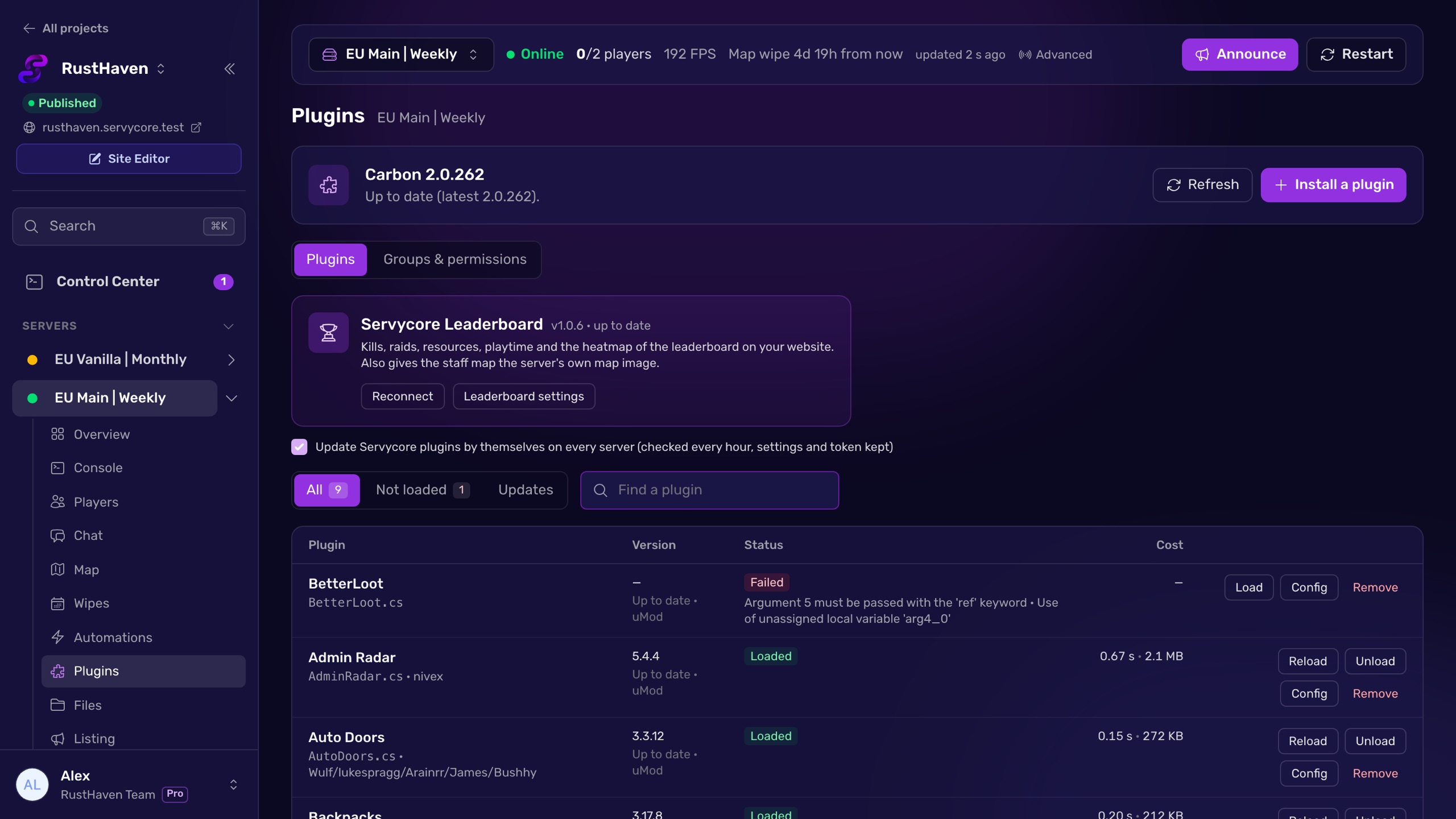
Servycore detects which framework each server runs and uses the right prefix for every command it sends itself: groups, temporary VIP, staff roles and permissions. The Plugins page and the groups and permissions editor work the same on Oxide and Carbon, with the right folders for configs. Commands you write yourself, like account linking rewards, are sent exactly as you typed them: an oxide. command sent to a Carbon server shows up as failed, so you spot the wrong prefix right away. A group given to a player who never joined waits for their first connection instead of failing.
Questions people ask
Can Carbon run Oxide plugins?
Yes. Carbon loads plugins written for Oxide. Their configs and data go in Carbon's folders (carbon/configs, carbon/data), and their permissions are managed with c. commands.
Why does oxide.usergroup do nothing on my Carbon server?
Carbon refuses oxide. commands by default and does not even answer. Use c.usergroup add <steamid> <group>, or enable the Oxide aliases in carbon/config.json.
How do I know if my server runs Oxide or Carbon?
Send c.version and oxide.version from the console: the one that answers is installed. If neither answers, the server runs vanilla Rust.
Why is a former admin still in the admin group on Oxide?
Oxide adds owners to its admin group when they connect but never removes them. Run oxide.usergroup remove <steamid> admin after removing the role.
Do I need to update Oxide or Carbon after the monthly update?
Yes. Both publish a release for each new Rust version. An outdated framework is a common reason plugins stop working after force wipe day.
With Servycore
One panel for Oxide and Carbon
Servycore detects the framework of each server and uses the right commands for groups, VIP and permissions, with the same plugins page and permissions editor for both.
- Plugins and files in the knowledge base
- Staff, groups and permissions in the knowledge base
Read next
- How to install plugins on a Rust server Install Oxide or Carbon plugins on your Rust server: the folders, loading and reloading, configs, permissions, updates and removal, step by step.
- How to give VIP on a Rust server Create a VIP group in Oxide or Carbon, give it plugin permissions and add players with usergroup add, on every server, without the usual traps.
- Rust Admin Commands Rust admin and RCON commands with syntax, examples and which ones work over RCON, checked against Rust's own code. Players, bans, staff, server, Oxide and Carbon.