How to install plugins on a Rust server
Install Oxide or Carbon plugins on your Rust server: the folders, loading and reloading, configs, permissions, updates and removal, step by step.
6 minute read, checked against Rust's own code. Updated .
Rust plugins are C# files (.cs) that run on a modding framework, Oxide or Carbon. To install one: make sure your server runs a framework, put the plugin's .cs file in the framework's plugins folder, and it loads by itself within seconds. Then adjust its config file and give the permissions it needs.
Step 1: run a framework
Vanilla Rust does not load plugins. You need one of the two frameworks:
- Oxide (uMod), the long-standing one, with its commands under
oxide.; - Carbon, the newer one, with its commands under
c., which also loads Oxide plugins.
Not sure which one your server runs? Send oxide.version and c.version from the console: the one that answers is installed. If neither answers, the server is vanilla (Rust stays silent on a command it does not know). Our Oxide vs Carbon guide compares the two.
Most game panels install the framework for you: look for a framework or "modding" option in the server's startup settings. Keep it up to date: after Facepunch's monthly update, Oxide and Carbon publish a new release for the new Rust version, and an outdated framework is one of the most common reasons plugins stop working.
Step 2: find the plugin
Plugins come from two main places:
- uMod: free plugins, one
.csfile each, downloaded from the plugin's page. - Codefling: free and paid plugins. A download is often a
.zipwith the.csand a readme; paid plugins download only from the account that bought them.
Before you install, check three things on the plugin's page: that it is maintained for the current Rust version, which framework it supports (Carbon also runs plugins written for Oxide), and which other plugins it depends on (some need a library plugin installed too).
Step 3: upload the file
Upload the .cs file to the plugins folder of your framework, at the root of the server:
| Oxide | Carbon | |
|---|---|---|
| Plugins | oxide/plugins |
carbon/plugins |
| Configs | oxide/config |
carbon/configs |
| Data | oxide/data |
carbon/data |
| Language files | oxide/lang |
carbon/lang |
| Logs | oxide/logs |
carbon/logs |
Use your host's file manager, SFTP or FTP. A few rules:
- Upload the
.cs, not the zip: extract it first and keep only the plugin files. - Keep the file name: the framework expects the file to be named after the plugin's class, as the author shipped it.
- Only the top of the plugins folder is compiled: files in sub-folders are ignored, which makes a
backupssub-folder a safe place for old versions.
Step 4: check that it loaded
Oxide and Carbon watch the plugins folder: a new or changed file is compiled and loaded within seconds, without a restart. Check the result:
- Oxide:
oxide.pluginslists every plugin with its version, author, and the time and memory it uses, for example01 "Kits" (4.0.0) by … (0.12s / 1 MB). - Carbon:
c.pluginslists loaded, unloaded and failed plugins. Right after an upload, Carbon leaves the plugin out of the list while it compiles: wait a few seconds.
If it failed, the console shows the compile or load error. You can also act by hand:
oxide.reload Kits     c.reload Kits
oxide.load Kits       c.load Kits
oxide.unload Kits     c.unload Kits
Step 5: configure it
Most plugins write a config file the first time they load: oxide/config/<Name>.json or carbon/configs/<Name>.json. Edit it, then reload the plugin (oxide.reload <Name> or c.reload <Name>) so it reads the new values. A JSON typo can stop the plugin from loading, so keep a copy of the working version before you edit.
Plugins that store things (kits given, homes, shop balances) write to the data folder, and their messages to the lang folder, where you can translate them.
Step 6: give permissions
Most plugins have permissions such as kits.use or backpacks.use. Give them to a group rather than to players one by one:
oxide.grant group default backpacks.use
oxide.grant group vip kits.vip
oxide.usergroup add 76561197960287930 vip
On Carbon, use the same commands with the c. prefix: c.grant group vip kits.vip, c.usergroup add <steamid> vip. Carbon does not accept the oxide. commands unless you enable those aliases in its config. Two more things to know:
oxide.show perms/c.show permslists every permission the loaded plugins registered, andshow group <name>what a group has.- Adding a player to a group is refused if that SteamID never joined the server ("Couldn't find that player." on Carbon). Wait for the player's first connection, then try again.
Need someone's SteamID64? The SteamID converter turns any format into the one these commands use.
Updating and removing plugins
- Update: upload the new
.csover the old one. The framework reloads it. Keep the previous file inplugins/backupsin case the new version misbehaves, and read the changelog: a new version sometimes adds config options or renames permissions. - Remove:
oxide.unload <Name>(orc.unload <Name>), then delete the.cs. The config and data files stay: delete them by hand if you want a clean slate, or keep them in case you reinstall. - Watch the cost: the time and memory shown by
oxide.pluginsadd up. A plugin that spends seconds in its hooks is a usual suspect when the server FPS drops.
With Servycore
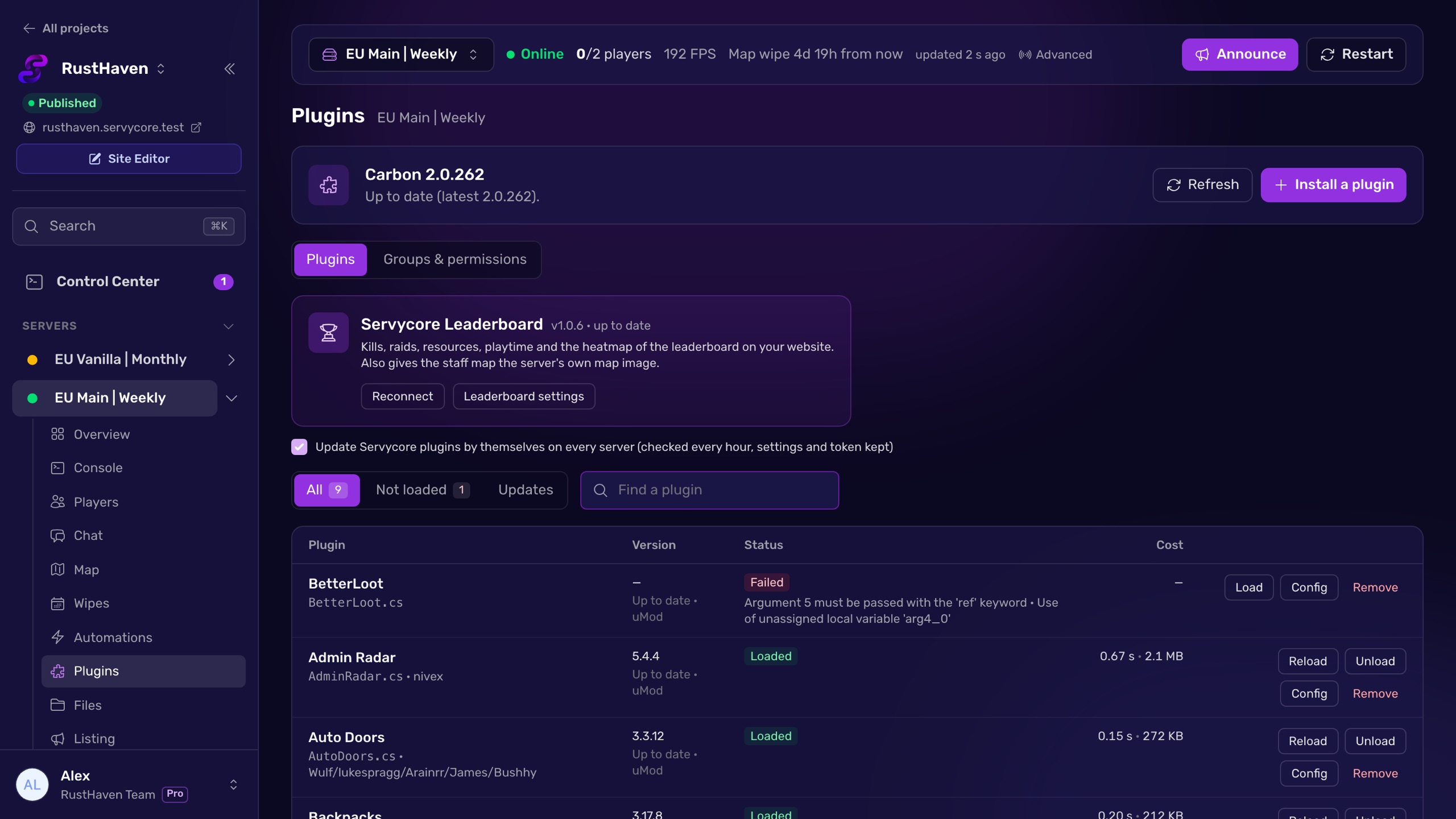
The Servycore Plugins page lists every plugin of the server with its state, version, time and memory, and checks for updates against the source of the plugin's author on uMod and Codefling. Search uMod and Codefling from the panel and install in one click (free plugins directly, paid ones with your Codefling account); the previous version is copied to plugins/backups before an update. Load, reload and unload, open a config in the built-in editor, and manage groups and permissions in the same place, on Oxide or Carbon. Nothing is installed on your server unless someone on your team clicks.
Questions people ask
Do I need to restart the server after installing a plugin?
No. Oxide and Carbon load a new or changed .cs file by themselves within seconds. A reload command does the same if you want to force it.
Where do I put Rust plugins?
In oxide/plugins on Oxide, or carbon/plugins on Carbon, at the root of the server. Upload the .cs file itself, not the zip it came in.
Can I use Oxide plugins on Carbon?
Yes, Carbon loads plugins written for Oxide. Commands differ though: use the c. prefix on Carbon (c.grant, c.reload).
Why doesn't my plugin load?
Check the console right after the upload: it shows the compile or load error. The usual causes are a plugin not updated for the latest Rust version, a missing dependency plugin, a framework that is out of date, or a broken JSON config.
How do I give a plugin permission to everyone?
Grant it to the default group, which every player is in: oxide.grant group default <permission> on Oxide, c.grant group default <permission> on Carbon.
With Servycore
Plugins in one click
Search uMod and Codefling from Servycore, install and update in one click with a backup of the old version, and edit configs, groups and permissions on Oxide or Carbon.
- Plugins and files in the knowledge base
Read next
- Oxide vs Carbon: which Rust modding framework? Oxide (uMod) and Carbon compared for Rust server owners: commands, folders, admin groups, plugin compatibility and how to switch between them.
- SteamID Converter Convert a SteamID64, STEAM_0:X:Y, [U:1:N] or Steam profile link into every other format. Free, instant, no Steam API call.
- How to give VIP on a Rust server Create a VIP group in Oxide or Carbon, give it plugin permissions and add players with usergroup add, on every server, without the usual traps.