The Servycore leaderboard tracks detailed player statistics for your Rust server, including kills, deaths, playtime, and more. It also features interactive heatmaps showing player activity across the map.
The leaderboard comes with the Basic plan and higher, and only works with Rust servers.
Prerequisites
- A Rust game server connected to Servycore
- A Basic or Pro plan (the Free plan does not include the leaderboard)
- The Servycore leaderboard plugin installed on your server
Plugin Installation
Step 1: Install the Plugin
Install the Servycore leaderboard plugin on your Rust server.
Step 2: Authenticate
Run the setup command in your Rust server console:
servycore.leaderboard auth TOKEN::PROJECT_ID::SERVER_UUID
You can find this command in Panel > Your Project > Leaderboard > Setup.
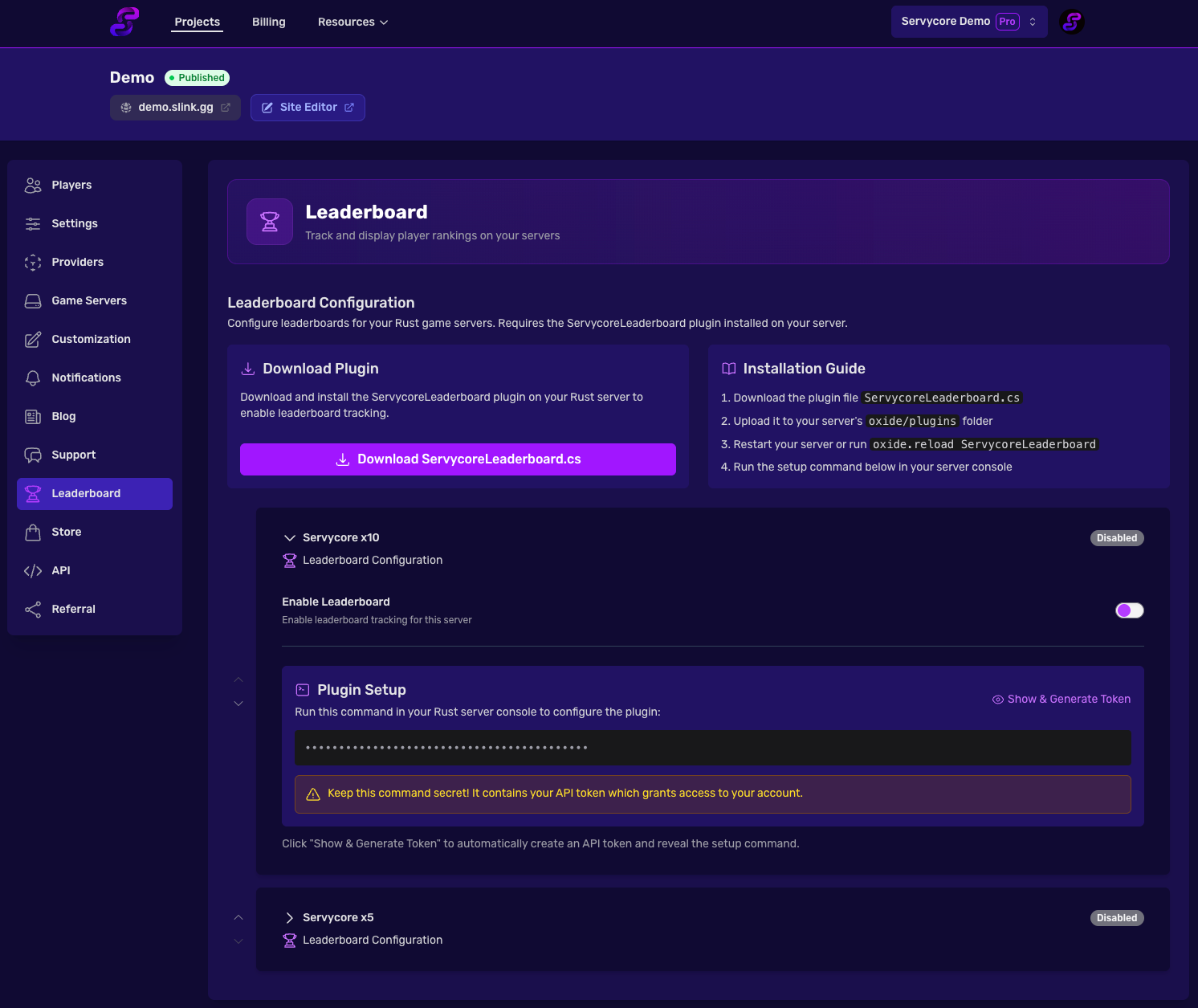
Player Statistics
The leaderboard tracks the following stats per player per wipe:
| Stat | Description |
|---|---|
| Kills | Total player kills |
| Deaths | Total deaths |
| K/D Ratio | Kill-to-death ratio |
| Damage | Total damage dealt |
| Playtime | Time spent on the server |
| Resources Gathered | Total resources harvested |
| Headshots | Total headshot kills |
Players can be sorted by any stat column. The default sorting is by kills (highest first). You can search for specific players by their Steam name or Steam ID.
Wipe Tracking
Each server wipe creates a new leaderboard period. Wipe data includes:
| Field | Description |
|---|---|
| Map Size | The size of the current map |
| Map Seed | The map generation seed |
| Map Image | Visual representation of the map |
| RustMaps URL | Link to the map on RustMaps |
Event Tracking
The plugin tracks 38 different event types across multiple categories:
Combat Events
Kill, death, wounded, revive
PvE Events
NPC kill, animal kill
Loot Events
Crate opened, barrel destroyed, hackable crate, supply drop, player loot
Raid Events
Rocket fired, explosive used, structure destroyed, door destroyed
Building Events
Structure placed, tool cupboard placed, tool cupboard destroyed
Vehicle Events
Vehicle spawned, helicopter kill, Bradley kill
Monument Events
Monument entered, cargo ship entered
Global Server Events
Helicopter spawned/destroyed, Bradley spawned/destroyed, cargo ship spawned/left, Chinook spawned, airdrop spawned, small/large oil rig event, excavator activated
Session Events
Respawn, connect, disconnect
Interactive Heatmaps
The leaderboard includes interactive heatmaps showing player activity on the map.
Heatmap Layers
| Layer | Description |
|---|---|
| Kills | Where kills happen on the map |
| Deaths | Where deaths happen on the map |
| Positions | Player movement trails |
| Events | Where specific events occur |
| Live Players | Real-time player positions |
Filters
- By Weapon - Filter kills/deaths by weapon used
- By Player - Filter to a specific player (admin only for other players)
Privacy
- Admins can see all player positions
- Regular players can only see their own position data
Live Player Data
When players are online, the leaderboard shows real-time data including:
- Steam name and ID
- Position on the map (X, Z coordinates and grid)
- Status: alive, sleeping, or wounded
- Current health
Notes
- Stats reset with each wipe
- Previous wipes keep their rankings (players, teams, kills, playtime) and stay accessible. Their map layers and events are kept 30 days after the wipe ends
- The map shows where players spend time and where events happen as 50 m squares, for the whole wipe. Individual building, crate, loot and barrel events are listed for 48 hours (they still count in the map and the player stats), player positions for 48 hours (online players, trail API)
- The leaderboard page is publicly accessible on your project's portfolio
- If your server loses its connection to Servycore for a moment, nothing is lost: the plugin keeps the stats, events and kills and sends them again (kills since plugin 1.0.7). Since 1.0.7 it warns in the console only when Servycore stays unreachable for more than a minute. On Carbon, Carbon itself still logs each failed web request ("Failed executing 'POST' webrequest", "Connection reset by peer")