Introducing the Rust Control Center
Until today, Servycore ran everything around your Rust servers: your website, account linking, rewards, store, support tickets and leaderboard. With this update, Servycore manages your Rust servers too.
The Control Center brings your console, players, bans, wipes, automations, plugins and files into the same panel as your community. No RCON client, no wipe plugin, no extra bots: one place for your whole network.
This is also our biggest update since the rebranding. Here is everything that changes.
In short
- Rust Control Center: live network, console, chat, players, bans that stop players before they join, F7 reports, live staff map, in-game staff and VIP groups.
- Auto-wipe system: your wipes run themselves, forced wipe included, with Discord announcements and a new map every time.
- Automations: restarts, chat filter, welcome messages, VIP trials, vote rewards and many more, without a plugin.
- Plugins & files: updates, one-click installs, a config editor, groups and permissions.
- Account linking that catches up: missed rewards are sent when the player joins.
- New website blocks: ban list, votes, server map, live population and next wipe.
- Simpler plans: almost every feature in every plan, Free included.
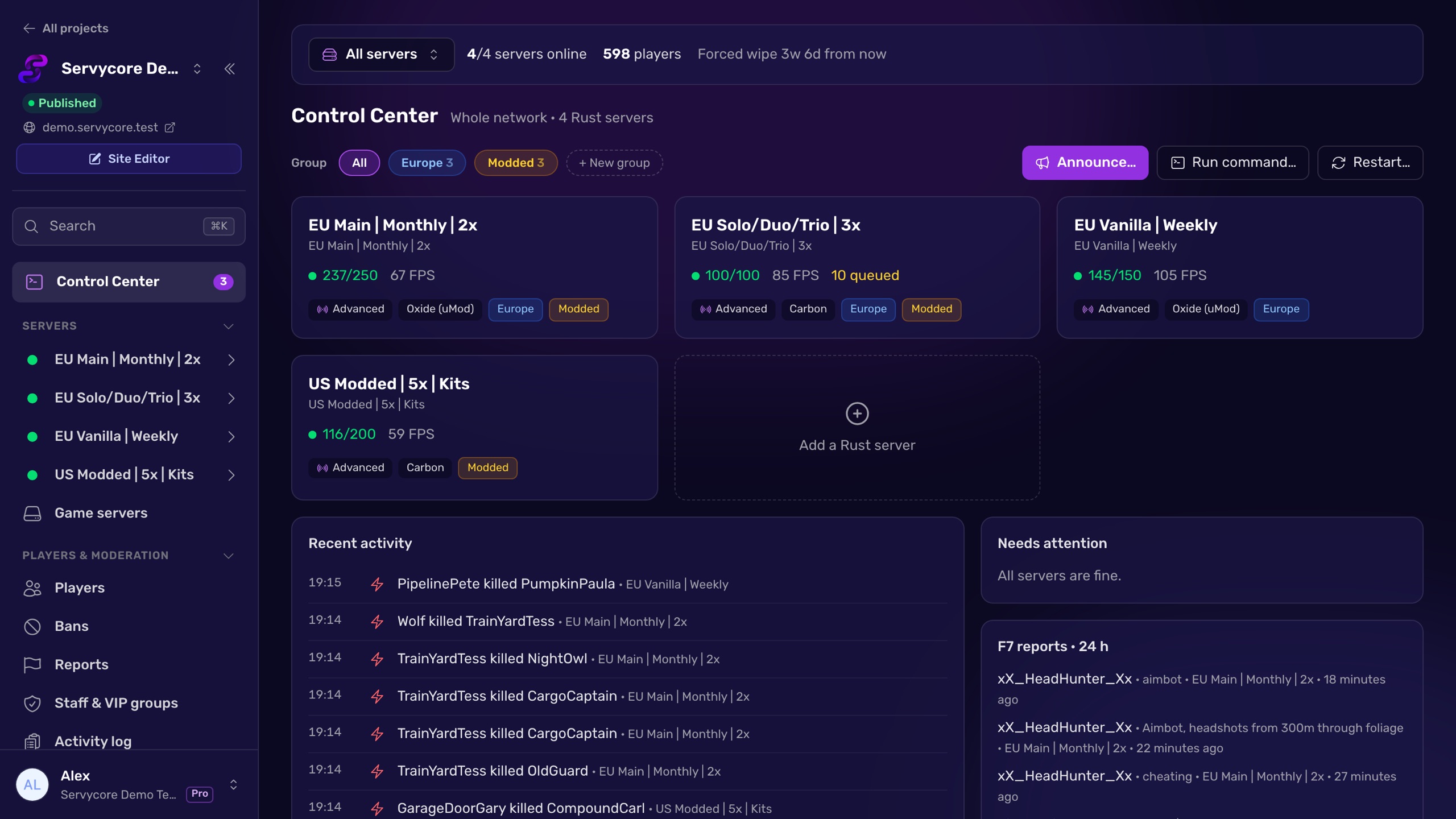
The Control Center
Connect a Rust server with its RCON password and the Control Center is ready. Nothing to install on the server and nothing to host. Your password stays with Servycore: your moderators get the tools, never the password.
The Control Center is for Rust servers only for now. Your other games keep the website, account linking and server commands exactly as before.
Your whole network at a glance
Every server, live: online or not, players and queue, FPS, entities, memory, uptime and the next wipe, with charts and history. A "Needs attention" panel shows what needs you, and server groups (Europe, Modded...) let you act on several servers at once: announce, run a command or restart with a countdown.
Console and chat
A web console with filters (errors, joins, kills, your commands), search, command history, autocomplete for Rust commands and favorites. The in-game chat is live too: filter it, write as SERVER, and mute or ban from a message in one click.
Players, bans and reports
- One player list for your project: linked players and everyone seen in game, with filters (online, linked, banned, VAC).
- Player profiles: linked accounts, playtime, sessions, PvP, Steam account and hours on Rust, chat, a timeline of what happened, private staff notes, bans and the combat log.
- Network bans that stop players before they join, on every server or the ones you pick, temporary or permanent, with a reason. Rust checks Servycore when a player connects: no plugin needed. You can import the ban list a server already has.
- Timed mutes that lift themselves.
- F7 reports inbox, grouped by reported player, to handle them one by one.
- Live staff map with player positions, reported players and recent kills, plus a replay of the last hours.
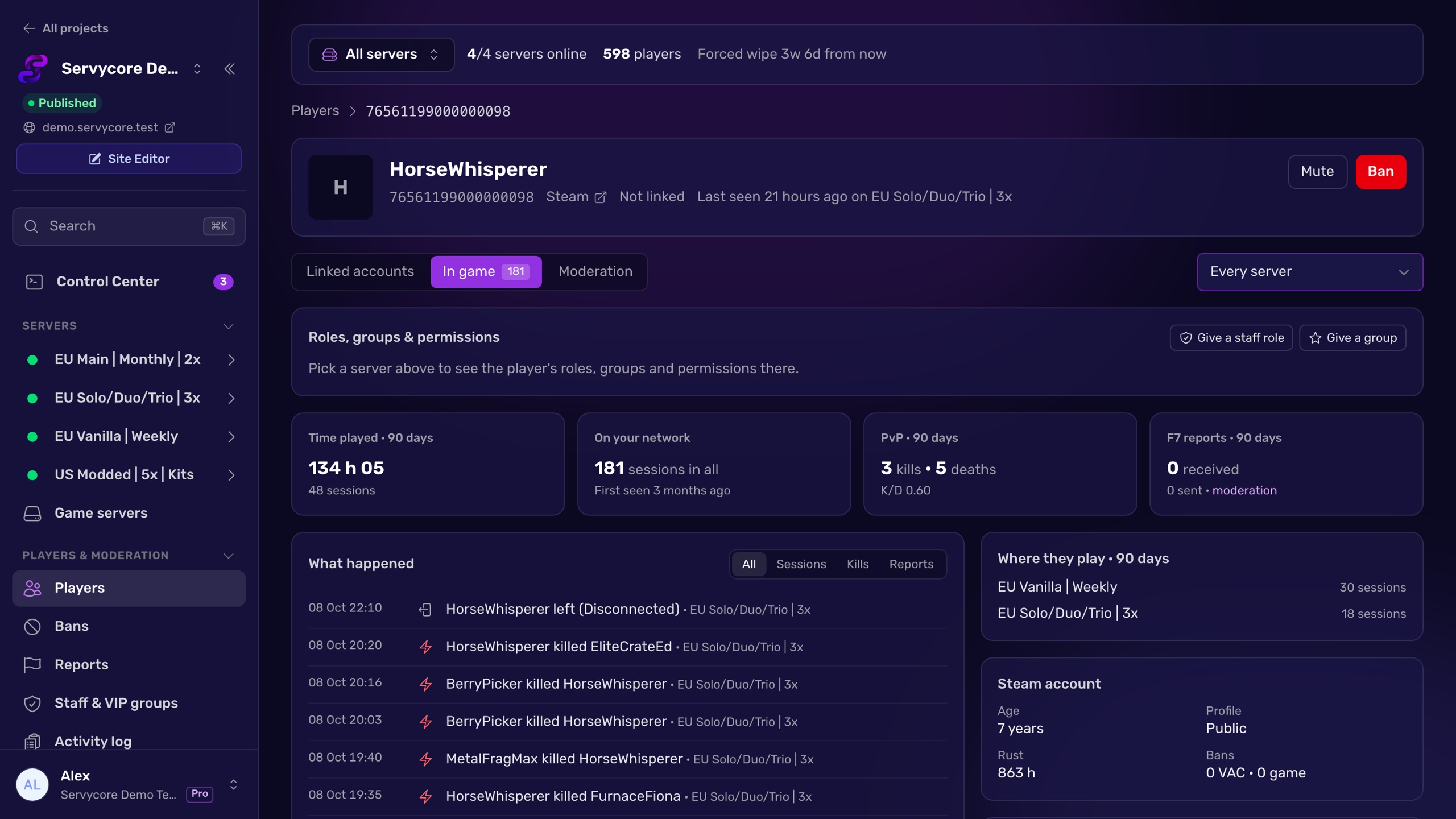
In-game staff and VIP groups
Give owner, moderator or skip-queue roles, and Oxide / Carbon groups (VIP, Discord...), on one server, several or all of them, for a while or for good. They are removed at the end on their own, and a group given to a player who has never been on a server reaches them on their first visit. Each group can come with a Discord role, and a permission editor lets you manage Oxide / Carbon groups and permissions on one server or the whole network.
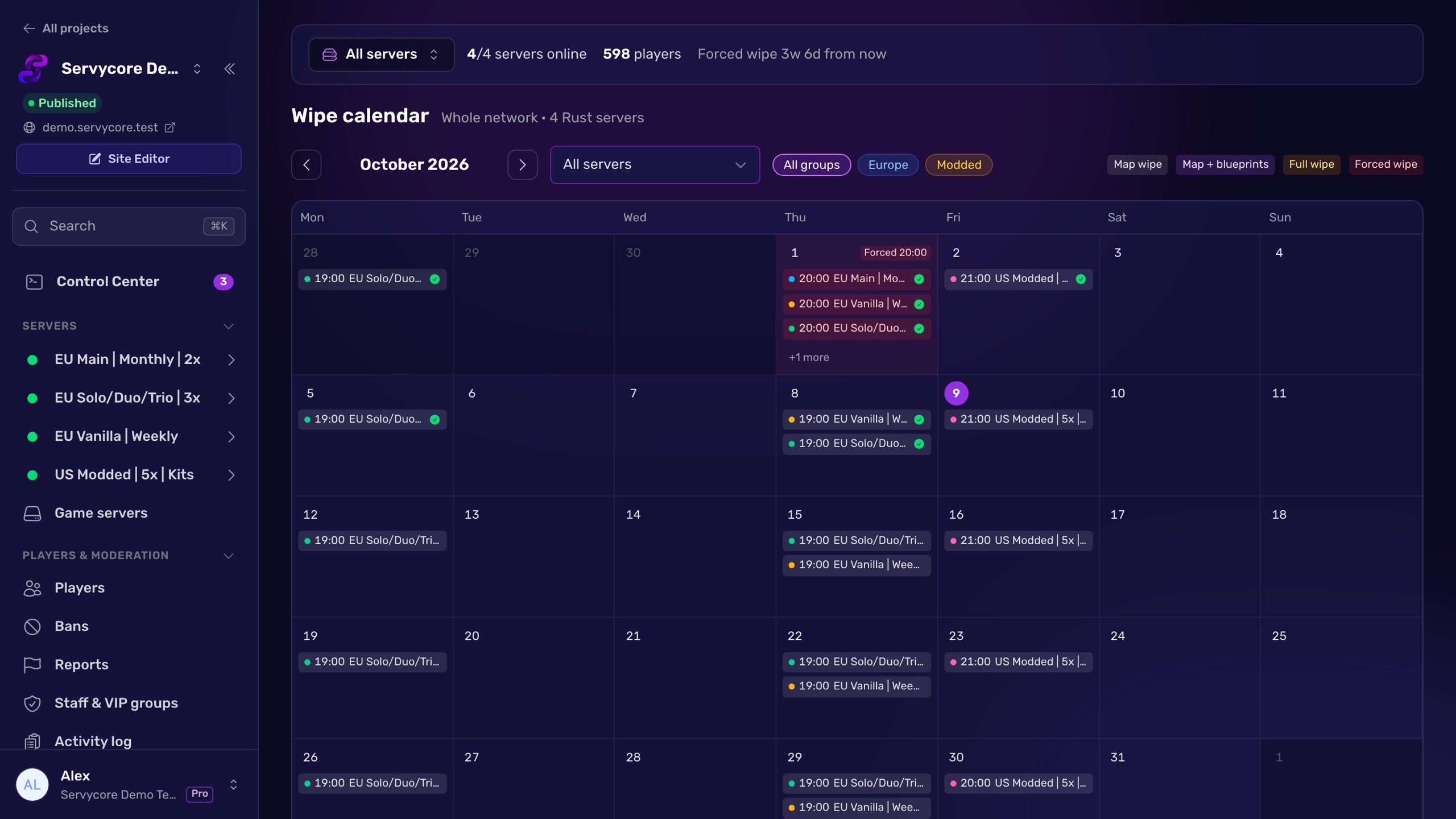
Auto-wipe system
Wipe day without staying up. Set your rhythm once (weekly, twice a week, biweekly, monthly...) and Servycore does the rest, every time:
- warns players in game and on Discord with a countdown,
- follows Facepunch's forced wipe and waits for the Rust and Oxide / Carbon update,
- saves, stops the server, takes a backup when your panel allows it, deletes the right files,
- sets the new map (fixed, random seed, a rotation or your own custom map),
- starts the server, checks the new world, renames the server and starts a new leaderboard season,
- posts the "just wiped" announcement on Discord with the new map image.
Skip or change a single date, ask for approval before a wipe, or simulate it first. If something goes wrong, you are alerted and can resume from the failed step. A wipe calendar shows every wipe of the network in one place.
The auto-wipe system needs RCON and your game panel: Pterodactyl, Pelican, WISP or AMP.
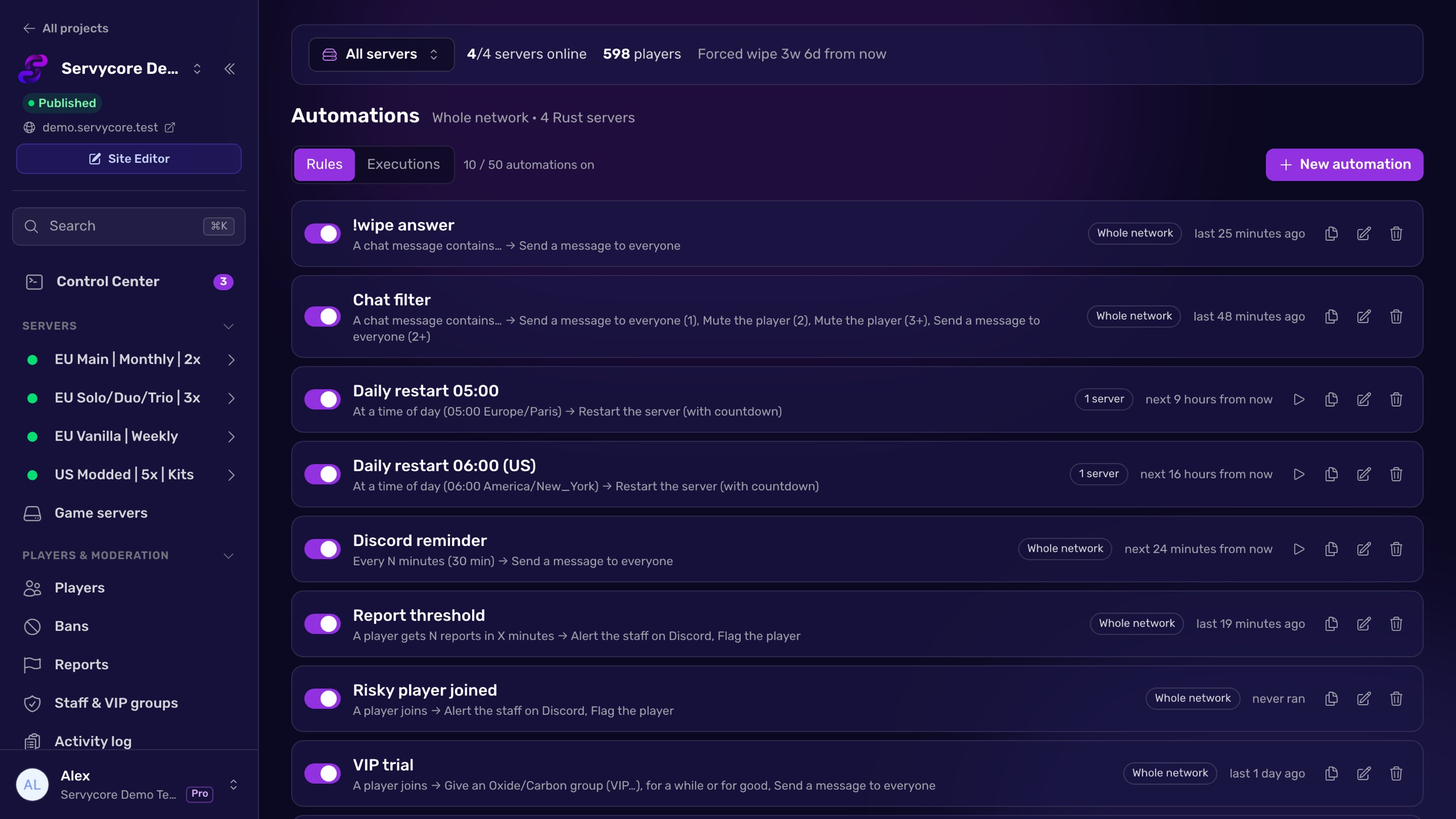
Automations
One automation engine instead of a dozen plugins. Pick a trigger (a time, an interval, a player joining, a chat keyword, F7 reports, population, low FPS, a restart, a wipe, a Rust or Oxide / Carbon update...), add conditions, and choose what happens: a message, a command, kick, mute, ban, restart with countdown, a Discord alert, a timed group, a webhook or a vote reward. Actions can escalate (warn, then mute, then ban).
Ready-made presets get you started in one click: daily restart, chat filter, !wipe answers, welcome message, VIP trial for new players, alerts on risky players, restart on Oxide / Carbon update, and vote rewards for rust-servers.net.
Plugins and files
- See every plugin of a server: loaded, failed (with the error), its version and what it costs.
- Search uMod and Codefling, install and update in one click (also the Codefling plugins you bought, once your account is connected), or upload your own plugin file.
- A file editor for your configs, with a check before saving and the previous version kept, and "copy this config to other servers".
- Servycore's own plugins install in one click and keep themselves up to date.
Several servers
Copy a wipe schedule, the server listing or automations to other servers, migrate settings from one server to another, or start a new server from an existing one: its linking commands, groups, wipe schedule and automations come with it.
Growth and activity
A growth report per wipe (new and returning players, how many come back after 1, 3 and 7 days, peak population), and an activity log of everything your staff, automations and servers did.
Connect a server in three steps
- RCON (required): console, players, chat, bans, automations.
- Host access (recommended): your Pterodactyl, Pelican, WISP or AMP panel unlocks the auto-wipe system, plugin installs, the file editor and map images. SFTP / FTP works too, for files only.
- Servycore plugin (optional): leaderboard stats and the kill feed.
The Connection page walks you through them, and the Control Center reminds you what each missing step would unlock. When the plugin sends nothing, it tells you why (not installed, not loaded, connected to another server, sending to the wrong address, a deleted API token...) and gives you the button that fixes it. Adding a server now starts with the game: pick Rust, give it a name, and RCON is set up first.
Discord
- New notification cards: Server Alerts and Moderation Alerts for your staff; Wipe Announcements, a Live Server Status message updated every few minutes and a Kill Feed for your players.
- Each card now says whether it is public or staff only, and warns you when a staff card shares a channel with a public one.
- New bot commands (information only):
/wipe,/map,/onlineand/vote. - Counter channels: channel names that show your players online, queue or servers.
Account linking that catches up
- Missed commands are sent when the player joins. A player who linked or unlinked while a server was offline, or who has never played on a new server, gets the right commands at their next connection. Every command of each provider is checked, for linking and for unlinking.
- Accounts are checked again when players join: Discord, Steam and Twitch rewards are confirmed at most once a day, only for the players who actually play.
- "Check again": a player who is linked but has no reward in game can ask for a new check from the linking page (once a minute).
- Rewards come back after an unban.
- A command that fails because a group does not exist on the server is now shown as failed, with what to do, and goes out again once the group exists.
- A new linking commands table: one collapsible table per provider with its "on link" and "on unlink" commands, and bulk actions on the selected rows.
Your community website
- Ban List block: the active bans of your network, with search.
- Vote block: vote buttons and the top voters of the month (rust-servers.net).
- Server map block: the current map and the maps of past wipes.
- Server Statistics can now show the next wipe with a live countdown and a 7-day population chart.
- The leaderboard map is faster, and its "History" and "Events" layers now work.
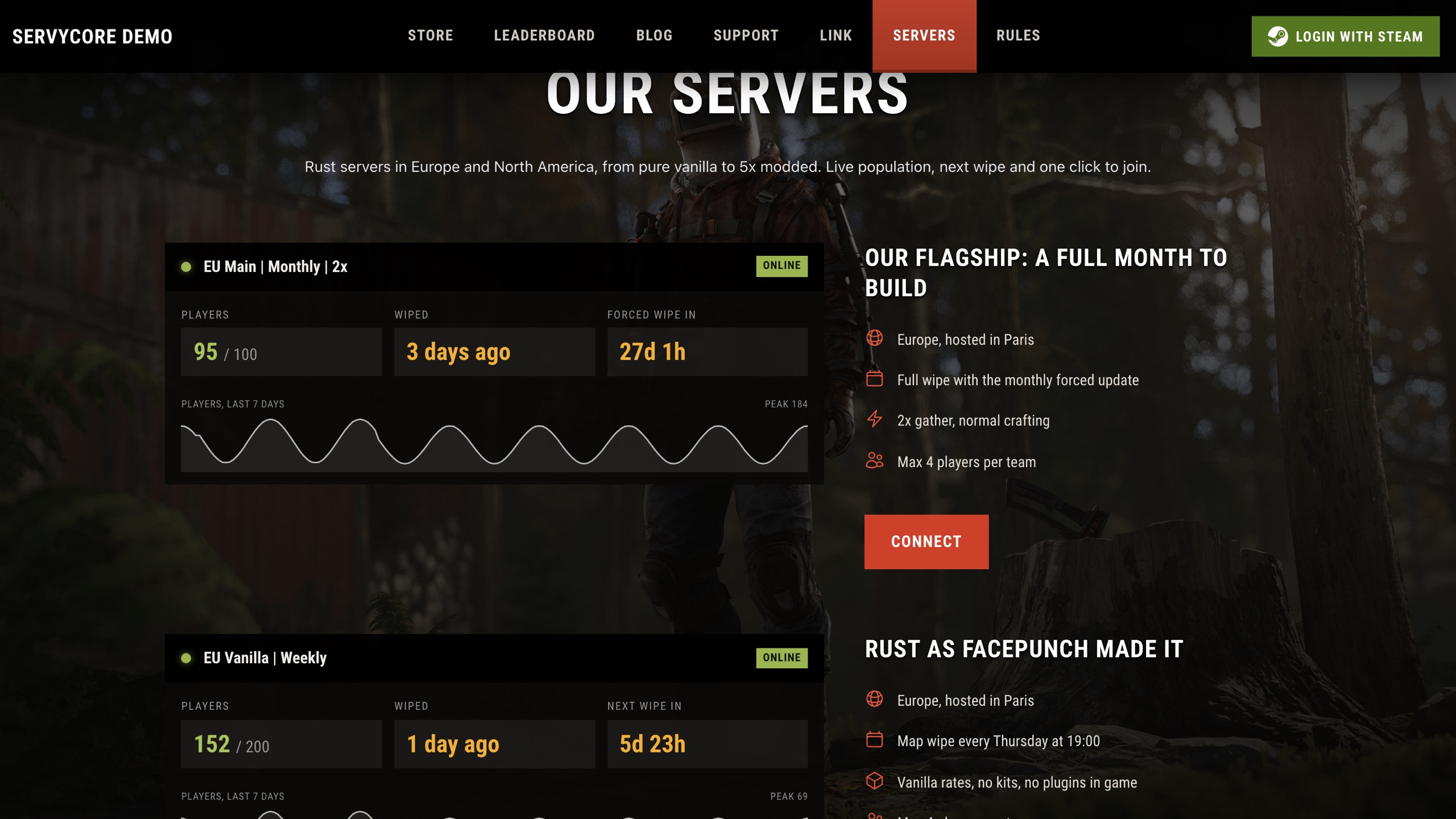
See all of it on our live demo site, including a new servers page built with custom pages.
A clearer panel
- One menu for your website and your servers, with the Control Center button always at hand, collapsible groups and every Rust server with its own pages.
- A project switcher in the menu, and your account, team and plan at the bottom.
- Game servers is now a table with the status of each server and whether its Control Center is ready.
- The Dashboard button of the website opens your project directly.
Simpler plans
Almost every feature is now included in every plan, Free included: plans differ by their limits. Prices do not change, no plan loses a feature, and Basic now runs 3 game servers instead of 2.
| Free | Basic | Pro | |
|---|---|---|---|
| Linked players | 150 | 500 | 10,000 |
| Game servers | 1 | 3 | 10 |
| Custom pages | 1 | 3 | 10 |
| Website, linking, blog, support tickets, store, custom meta | ✓ | ✓ | ✓ |
| Rust Control Center | ✓ | ✓ | ✓ |
| Rust automations | 1 | 3 | 50 |
| Rust activity history | 1 day | 7 days | 30 days |
| Custom domain, custom CSS, leaderboard, auto-wipe system | — | ✓ | ✓ |
- The Free plan gains the blog, support tickets, the store and custom meta (title, description, favicon, share image).
- The Ultimate plan is no longer offered: current subscribers keep it as it is. Need more than Pro? Contact us on Discord.
For developers
- New public API endpoints for your Rust servers: live status, upcoming wipes and active bans.
- Signed webhooks from automations, so your tools can check a call really comes from Servycore.
Good to know
A few changes may affect your current setup:
- Plugin tokens are now limited to their plugin and server. If you reused a plugin token in your own bot or script, create an API token for it in the panel.
- The Leaderboard Notifications card is gone: wipe messages now go through Wipe Announcements.
- Detailed leaderboard events of a finished wipe are kept for 30 days after the wipe ends. Rankings and player stats stay forever.
- On the Free plan, one custom page is shown to visitors. Extra pages stay in your editor, hidden from visitors.
Fixes
- Commands on ARK, CS:GO and 7 Days to Die servers were sometimes marked as failed when they worked.
- Leaderboard dates sent by the plugin could be one or two hours off.
- The activity log now records every action.
- Discord server and role IDs are checked when you save them, with a hint to copy the right ID.
- Turning a provider (Discord, Steam, Twitch) on or off no longer requires the rest of the form to be valid.
- Sign-up no longer fails when an external check is down.
Get started
The Control Center is already in your panel: open your project and add a Rust server with its RCON password. Every step is explained in the knowledge base.
Questions or ideas? Join us on Discord.
— The Servycore Team