How to schedule restarts on a Rust server
What the Rust restart command really does, why your host must bring the server back, how to cancel one, and how to schedule a daily restart.
6 minute read, checked against Rust's own code. Updated .
To restart a Rust server cleanly, send restart 300 "Daily restart" from the console or over RCON. Rust counts down in the chat for five minutes, kicks the players, saves the world and the config, and quits. Rust does not start itself again: your host's panel sees the process exit and launches it again. To restart every day, send that command at a fixed time with a scheduler: your host's task scheduler, a plugin, or an automation in a panel like Servycore.
What the restart command really does
The command is restart <seconds> "<message>". Both arguments are optional: without them the countdown is 300 seconds and there is no message. Read from Rust's own code, a restart goes like this:
- If you gave a message, the chat shows "SERVER Restarting:
" . - The countdown is announced in the chat: at the start, then every minute, every 30 seconds in the last five minutes, every 10 seconds in the last minute and every second for the last ten: "Restarting in 60 seconds (Daily restart)!".
- At zero, a last message, then every player is kicked with "Server Restarting".
- Rust runs
quit, which kicks anyone left, runsserver.saveandserver.writecfg, and exits.
So you do not need to save first: the quit saves the world and writes the config files. What Rust cannot do is come back. The process is gone, and it is your host's panel (Pterodactyl and the like) that notices and starts the server again. On a test server under Pterodactyl, the server was back online about 20 seconds after Rust quit.
If your host does not restart a server that exits, restart turns your server off. Check it once, at a quiet hour, before you schedule anything.
Changing your mind
- Send
restartagain to replace the countdown: players see "Restart interrupted!" and the new countdown starts with the new time and message. - Send
restart -1to cancel: the running countdown stops ("Restart interrupted!") and nothing is scheduled.
Picking a time and a countdown
- Your quietest hour. Look at when your population is lowest and restart then. Early morning in your players' time zone is the usual choice.
- A countdown players can act on. Five minutes lets everyone get home, close a door and log off. Much longer countdowns mostly fill the chat.
- Announce it before the countdown. A
saya few hours earlier ("Server restart at 05:00") saves you complaints from players in the middle of a raid. - Mind your wipe days. A restart scheduled during a wipe can get in its way; keep them apart.
Whether you need a daily restart at all depends on your server. Watch your FPS, entity count and memory over a few days: if they drift as uptime grows, a restart at your quietest hour brings them back. If they stay flat, a restart is optional.
Restart after an update
Oxide and Carbon release updates of their own between Rust's monthly updates. Many servers restart shortly after one comes out, so the new version loads (with a short countdown and a message such as "Updating Oxide"). This only helps if your host updates the framework when the server starts, as the usual Pterodactyl Rust setup does on every start.
For the monthly Rust update itself, the restart is part of wipe day: see the wipe guide and the wipe planner.
Ways to schedule it
| Option | How it works | Watch out for |
|---|---|---|
| Your host's scheduler | A task in the panel sends restart 300 "…" at a fixed time |
Check the time zone of the task; a power restart instead of the command skips the countdown |
| A plugin on the server | The plugin sends the command itself on a timer | One more plugin to keep updated; nothing runs if it fails to load |
| An outside tool over RCON | A scheduler connects with RCON and sends the command | It needs the RCON password and must reach the server on time |
Prefer sending the restart command over a raw power restart: only the command gives your players a countdown and saves the world before quitting.
Avoiding restart loops
Never tie a restart to "the server just started" or "the server came back online". The server would come back, see the event, restart, come back… If your tool lets you build rules on server events, keep restarts on a clock.
Scheduled restarts with Servycore
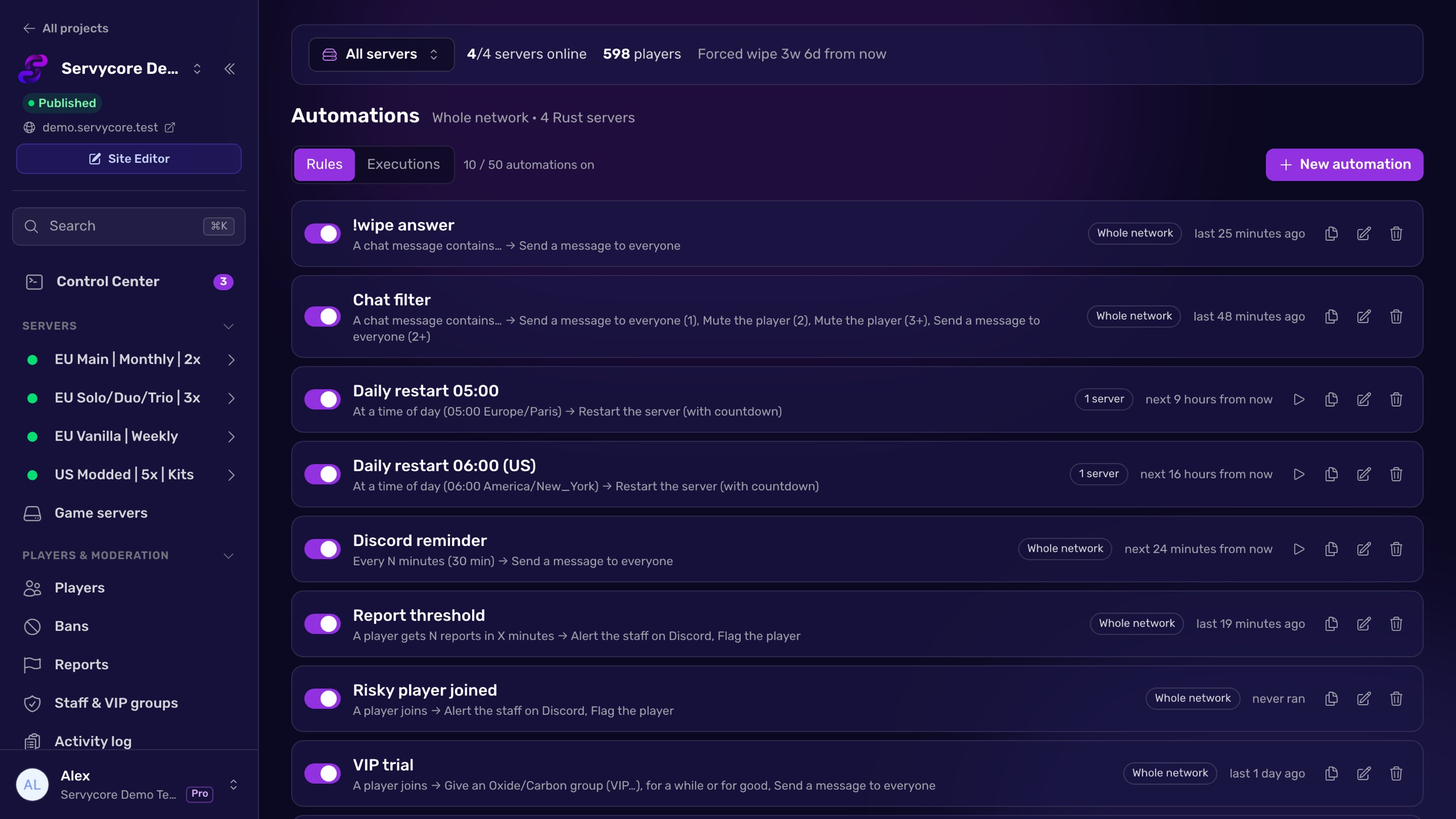
Servycore's Automations schedule restarts without a plugin, over the RCON connection of the Control Center:
- The Daily restart preset: every day at 05:00 (Europe/Paris by default, change the time and the time zone), with Rust's own 5-minute countdown and message. Pick the days, the time zone and the countdown (up to 3,600 seconds). Every new Rust server comes with it switched off.
- Restart on Oxide or Carbon update: Servycore watches the framework releases and restarts the servers that run it, with a countdown, within minutes of the release.
- Network, group or server: one automation restarts the whole network, a group of servers or one server, and can be turned off on a single server.
- No false alarms: a planned restart is never reported as the server going offline on your Discord.
- No loops: a restart on "The server restarted" or "The server comes back online" is refused when you save.
- A Restart button on each server for your staff, given only to the roles you allow, and every restart logged in the Activity log.
With your host connected too (Pterodactyl, Pelican, WISP or AMP), Servycore can also start and stop the server itself, which is what makes the automatic wipes reliable.
Questions people ask
What is the command to restart a Rust server?
restart <seconds> "<message>", for example restart 300 "Daily restart". It works in the server console and over RCON. Without arguments the countdown is 300 seconds.
Does the restart command save the server?
Yes. At the end of the countdown Rust runs quit, which saves the world (server.save) and writes the config (server.writecfg) before the process exits.
My server did not come back after a restart. Why?
Rust only quits; starting it again is your host's job. If your panel does not relaunch a server that exits, the restart leaves it off. Start it from the panel and check your host's settings for automatic restarts.
How do I cancel a restart?
Send restart -1. The countdown stops and players see "Restart interrupted!". Sending restart with new values replaces the countdown instead.
How often should a Rust server restart?
There is no fixed rule. Many servers restart once a day at their quietest hour. Watch FPS, entities and memory: if they get worse as uptime grows, restart daily; if they stay steady, you can restart less often.
Can players see when the next restart is?
They see the chat countdown once it starts. Announce it earlier with a scheduled say, or answer a chat command with the time of the next restart.
With Servycore
Restarts on a schedule, no plugin
Servycore restarts your servers at the time you pick with Rust's own countdown, after Oxide or Carbon updates too, and never reports a planned restart as an outage.
- Automations in the knowledge base
Read next
- Rust Admin Commands Rust admin and RCON commands with syntax, examples and which ones work over RCON, checked against Rust's own code. Players, bans, staff, server, Oxide and Carbon.
- How to use RCON on a Rust server Turn on Rust WebRCON, connect, and learn which admin commands work over RCON, plus the password and IP-ban rules that lock people out.
- How to wipe a Rust server Map, blueprint or full wipe: the exact files to delete in server/<identity>/, the ones to keep, and how to handle force wipe day step by step.